


docs/user/servers/manage-servers.md
title: Manage servers description: Server status, what runs where, roles, upgrades, and removing a server.
The Servers page lists every server in your organization. Open one to see what runs on it, turn builds on or off, or remove it.
Check your servers
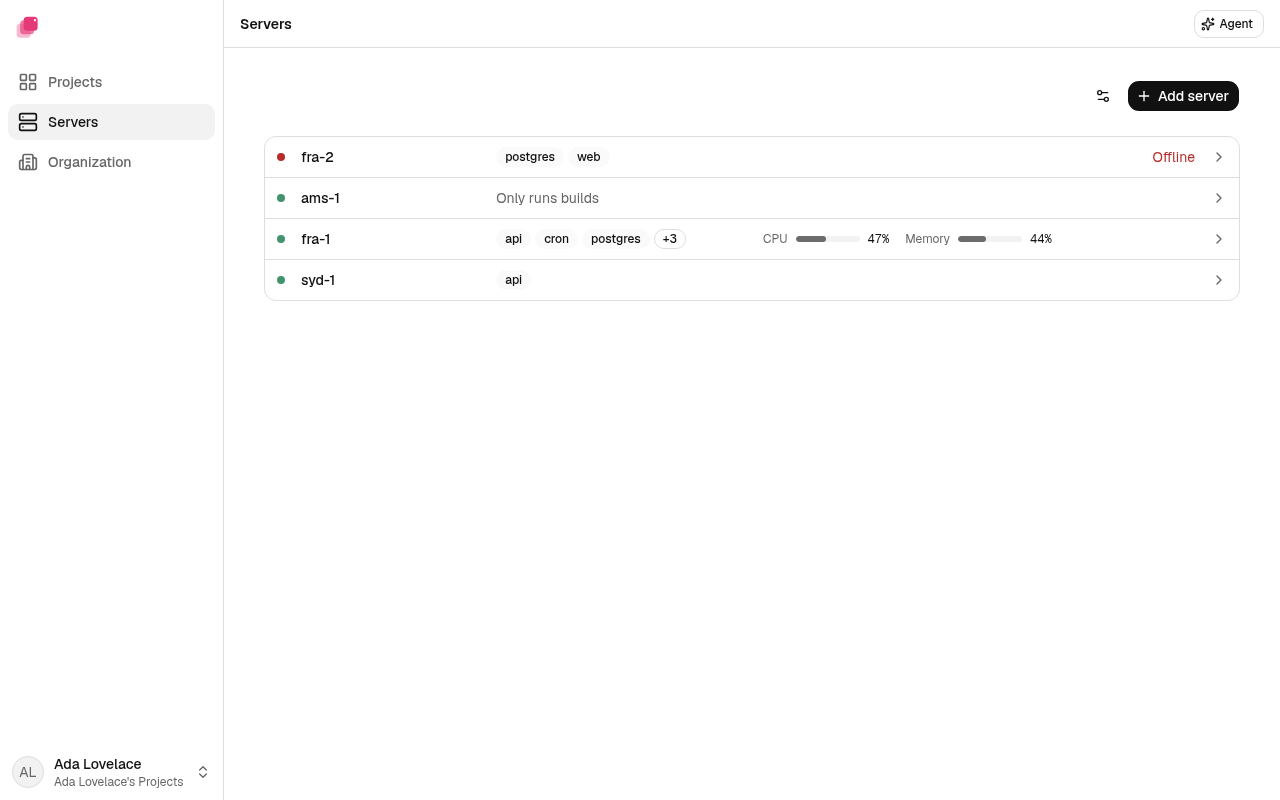
Each row shows a server's name and the services on it, up to three by name and then a count like +2. A green dot means the server is online, and the row says nothing more. A row names its status only when someone should look.
| Status | What it means |
|---|---|
| Green dot, no word | The server is up and in touch with your other servers. |
| Building | Online, and running builds right now. |
| Offline | Your other servers can't reach it. See A server shows Offline. |
| Unknown | Ployz can't tell whether it's up. Check it as you would an offline one. |
| Upgrading | Ployz is upgrading it. See Upgrade Ployz on a server. |
| Upgrade failed | Its last upgrade didn't install, and it went back to the release it ran before. |
When the list is wide enough, each row also shows how much of the server's CPU and memory is in use right now. The meters stay empty until the server sends a reading, and an offline server shows none. A dash means the server sent no recent reading for that meter. The server's page has disk and the full picture.
A server that can hold managed volumes shows nothing about storage. Docker only means it was added with Start without it and holds plain Docker volumes only. Volume support unknown means Ployz couldn't tell what it can store.
If the page shows Can't reach your servers right now, see Troubleshooting servers.
Servers waiting to join
A server you installed with a Fleet Token checks in with Ployz Cloud and waits. Ployz can't let a waiting server join yet; to add one you can deploy to, see Add one server that joins right away. To list the ones waiting:
| 1 | ployz server ls --waiting |
Each row shows the start of the server's id, its name, its provider, the IP address Ployz Cloud saw it check in from, its status and how long ago it first checked in. Ready means it has everything it needs. Installing Docker and Building ZFS mean it is still getting ready. Docker install failed means Ployz couldn't install Docker there. Blocked means something on the server stops Ployz from using it, and Offline means it stopped checking in.
To see one in full, with its CPU, memory, disks, Docker, the storage it would get and anything blocking it:
| 1 | ployz server show web-3 |
ployz server show shows a server in your cluster the same way, so one command covers both: its
OS, versions, addresses, storage, CPU, memory and disk, and how long a round trip to each other
server takes. Add --json for everything it knows, such as the features its daemon supports. It
also takes a waiting server's id, or the start of one at least 8 characters long, such as the
start the list prints. If two waiting servers share a name or the start you typed, it lists their
ids instead.
To enroll waiting hosts, select their names or hostnames with a quoted glob:
| 1 | ployz server enroll 'host-*' --name 'web-{n}' --status |
Ployz Cloud plans the names, founder and storage. The CLI prints that plan, source IPs and
anything skipped, then asks before starting. The oldest selected host is the default founder
when your organization has no cluster. Use --first host-a with a name glob or --all to
choose another selected host. Put the glob before --first.
Bare --first enrolls only the oldest match. --all selects every waiting host and prints
how many came from each provider, including Unknown.
--name 'web-{n}' numbers the planned names. Without it, each server keeps its hostname.
Selection takes names or hostnames, never IDs. --storage zfs is the default. It uses a spare
disk when available and falls back to Docker volumes where ZFS cannot run. Add
--no-spare-disk to keep ZFS on the main disk, or --no-fallback to skip hosts that cannot
use ZFS. --storage none uses Docker volumes. Each enrolled server accepts services, ingress
and builds.
Add --yes to accept the printed plan without a prompt. Without a terminal or with --json,
Ployz requires --yes and otherwise returns the plan with confirmation_required.
To enroll every waiting host without a prompt, for example in a script:
| 1 | ployz server enroll --all --yes --json |
A command that skips any hosts exits 3 and includes the reasons in its JSON result. If Cloud starts different names or roles, or omits a planned host, the CLI reports the changes and exits 3. Enrollment continues in Cloud.
--status follows each attempt and prints a line when its stage changes. Queued means
the host is still preparing its storage. In line · 3 servers ahead means it is waiting
for a join slot. If Cloud cannot see a current position, the CLI says Join position unknown.
A failed attempt prints the host's error. Ctrl-C stops following while enrollment continues.
With a selection, --status starts matching hosts that are not already enrolling after
confirmation, then follows both existing and new attempts. Bare --first --status stays
limited to the oldest matching host. An unknown state makes the command exit 3 once the
other attempts end.
Resume open attempts without starting new ones:
| 1 | ployz server enroll --status |
| 2 | ployz server enroll --status --json |
To turn away servers you don't want, name them, give a pattern or give one server's id. The start
of an id works too, at least 8 characters long and matching only one server. A name rejects every
waiting server with that name. Patterns match names only, and case matters. An exact id wins over
a server whose name is that id, a server named exactly what you typed wins over an id that starts
that way, and either wins over the pattern it spells, so db[1] means that name. Ployz lists what
matches with each one's id and asks before it does anything:
| 1 | ployz server reject 'web-*' |
Answer y and it prints 2 rejected. They won't come back under the same Fleet Token. A rejected
server stops checking in, and asking again with the same Fleet Token gets it turned away. To keep
out every server that holds a Fleet Token, revoke the token. If one left the list before Ployz
Cloud got to it, the count says so, as in 1 of 2 rejected; the rest had already left the list.
Add --yes to skip the question, for example in a script. Without --yes outside a terminal it
fails with confirmation_required and rejects nothing.
ployz server reject sends servers to Ployz Cloud in batches of 1000. If Cloud refuses the first
batch, for example with a 403 because you are not a member, the reject fails with that error and
nothing was rejected. If a timeout, a dropped connection or a Cloud error stops a batch, the reject
stops with exit code 3 and prints how many went through, how many may or may not have been rejected
and how many were not. This includes a timeout on the first batch, which leaves that whole batch
uncertain. --json lists those ids under uncertain and not_rejected. Run the same reject again
to finish. If Cloud refuses a later batch, the reject also stops with exit code 3, and that batch
and the rest count as not rejected.
A name with characters a terminal would act on, such as color codes, prints with � in their place.
Copying it back from the screen won't match, so take the id or the exact name from
ployz server ls --waiting --json. A command Ployz suggests for such a name quotes it as $'...',
which bash and zsh read but other shells may not.
See what runs on a server
Click a server. Its page shows its status and public IP address, then:
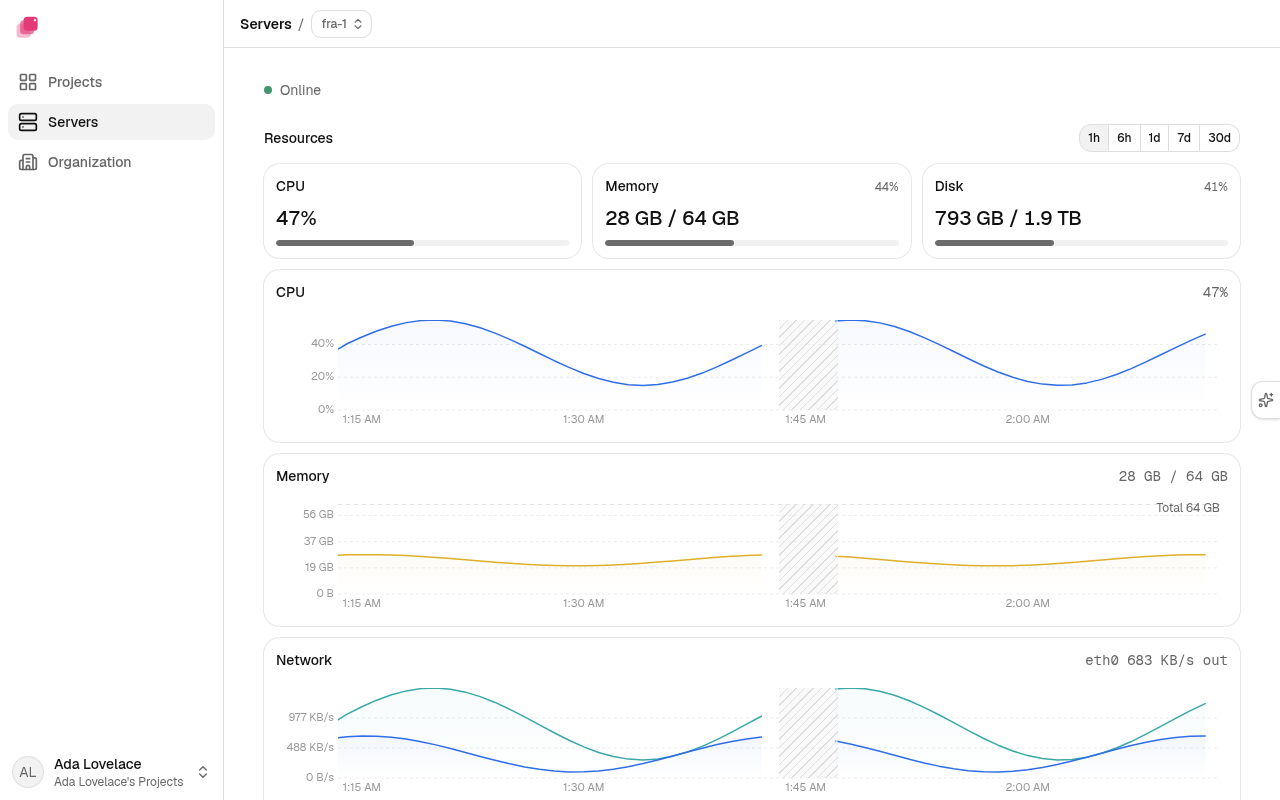
Resources: meters for CPU, memory and disk now, then charts of CPU, memory and network over the range you pick, from 1h to 30d. The meters and the values above each chart always show the last few minutes, whatever the range; a dash means the server sent no recent reading. Network shows each interface in its own color, out as a solid line and in as a dashed one. The disk bar splits used space into Volumes, Mirrors, Logs and metrics and Other, then Free. Space the server couldn't attribute to one of those shows as Used. A stretch the server didn't measure is hatched Not measured. A server on an older Ployz version reads Upgrade web-1 to see its metrics. If it doesn't reply, the section reads web-1 didn't answer. While the server is offline, the page leaves Resources out.
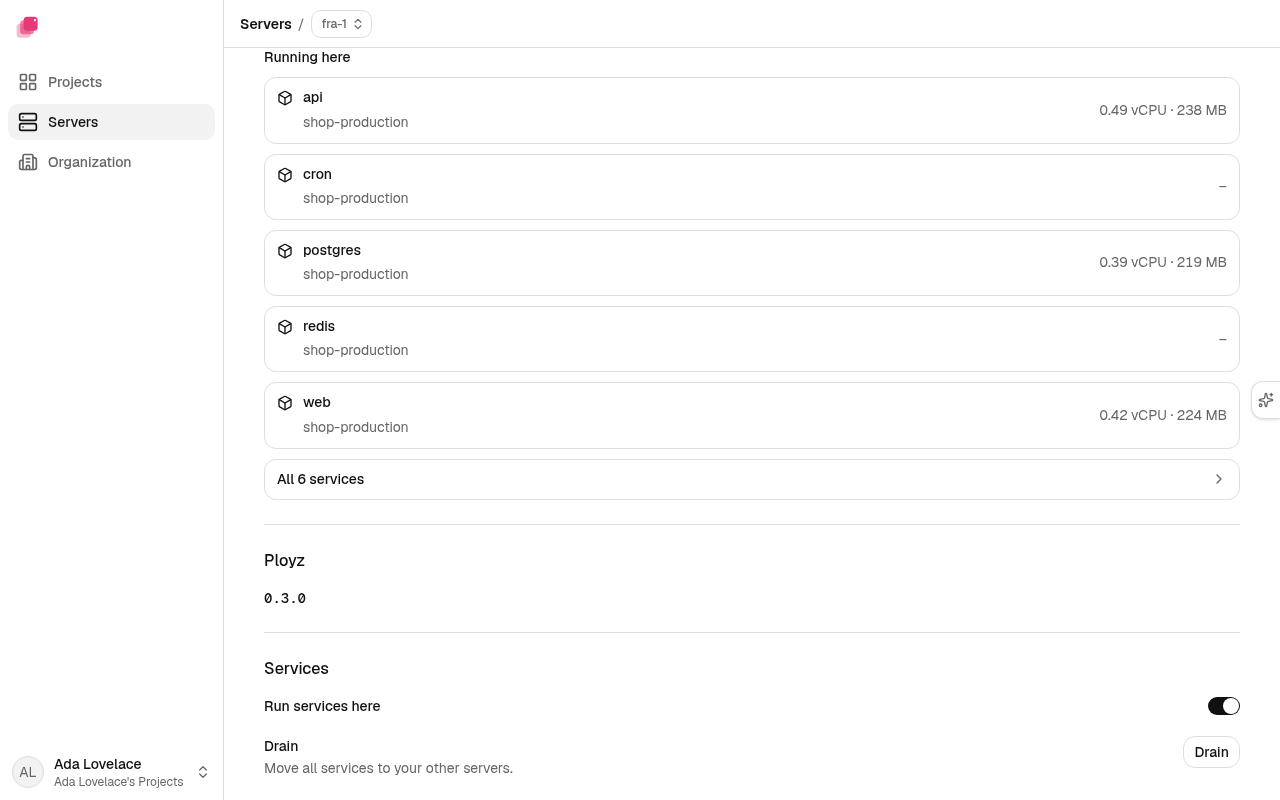
Running here: the server's services, with the CPU and memory each uses on this server now, refreshed when you open or return to the page. A service with no recent readings on this server shows –. Past five, All 12 services opens the full list, with a filter. While the server is offline, each one says whether it's Still on another server or Down.
Services: Run services here and Drain. See Change what a server does.
Builds: Run builds here and Builds at once. See Where builds run.
An entry marked Not in any Project is left over from a deleted project or environment. Remove deletes its containers and its volumes, data included, from every server.
Reach a server from the CLI
When the CLI reaches your servers through Ployz Cloud, only owners and admins can run these commands:
exec, service start, service stop, service restart,
service port-forward, server ls, server show, server logs, server set,
server drain, server upgrade, server rm, server forget <server> and server clean
without a namespace. A member who runs one gets this, and the command exits 1:
| 1 | Server access needs an admin. Ask an owner or admin of acme. |
Members can still deploy, and still see logs and restart services on these pages. logs, ps
and metrics still work for them in the CLI: Ployz Cloud reads the servers for them and shows
each server's newest 200 lines at most, so logs --follow needs an owner or admin. An admin
moved to member loses this access within 5 minutes.
Change what a server does
Every server runs builds, runs services and takes web traffic. To turn one off, see
Give servers different jobs. The
Ployz agent can change these too, but it can't turn web traffic
back on: that starts the server's web server, which the switch below and ployz server set do.
Under Services on a server's page, turn off Run services here and nothing new starts on the server. What already runs there stays until you drain it, or until your next deploy moves it to your other servers. If no other server runs services, deploys fail until you turn the switch back on or add a server.
To move everything off now, click Drain and confirm. The dialog lists what runs on the server and badges what won't move: Skipped when no project owns it, which draining leaves where it is, Stays when the last drain left it because its data is on the server, and Stops for a global service that runs on no other server, which the drain removes. Draining turns services off for the server and stops its global services there. Then it moves each replicated service's containers to your other servers one at a time. Each new container runs the same image, and each one starts and is healthy before the old container is removed. Pre-deploy commands don't run again, and nothing is deployed. The drain starts once you confirm: the dialog is the approval. If a global service's last other copy stopped while the dialog was open, the drain doesn't start; open it again to see what stops now. Drains in one organization run one at a time: a second one reads Queued · Waiting on web-1. While a drain runs, the Drain row counts the services left to move and lists them as Pending; each one leaves the list as it leaves the server. You can leave the page while one runs.
While a server drains, you can't turn Run services here back on for it: Cloud refuses the change until the drain ends. Turning services on for another server waits until the organization's drain ends. Other server settings, like Run builds here, never wait for a drain.
A service stays running where it is, and is reported with the reason, when:
- it mounts a volume or a bind mount on the server (tmpfs mounts don't count);
- its containers run different versions, because a deploy hasn't finished: deploy it first;
- a server it involves can't be checked right now;
- no other server can take it.
When the drain ends, the Drain row counts what moved, stopped, stayed and failed, and how many services no project owns it left alone. It lists each service with where it went or why it stayed. A drain that stops early marks the service it was moving Interrupted and the ones it never reached Not attempted; those still run on the server. If anything stayed or failed, the drain stopped early, or it couldn't check what's left on the server, the button reads Drain again. Turning services back on doesn't move anything back.
From the CLI, ployz server drain web-2 does the same and prints the report. If anything stayed or
failed, it exits non-zero. When you're signed in, Ployz Cloud runs the drain, as it does for the
button. Unlike the button, it waits for approval first when a global service would run on no other server (see
Destructive actions ask first).
The CLI stops waiting after 30 minutes and says so; the drain keeps running in Ployz Cloud.
Servers you run without Ployz Cloud belong to a context on your computer. Signed out, the same command drains from your computer through your current context. To use another context, name it:
| 1 | ployz server drain web-2 --context my-cluster |
Under Web traffic on a server's page, Takes web traffic is a switch. On, the line under it reads Your domains point at 203.0.113.10: the server's address. Turn it off and a dialog lists the domains pointed at your servers. When another server takes web traffic, it keeps serving them; when this is the only one, the dialog warns that they stop working. Confirm with Stop: the row reads Stopping… while the web server on it stops, and then Web traffic is off. Your generated addresses stop pointing at it within the hour, or when you click Check again under Domain in Organization → General. Until then, anyone sent to it gets no answer on ports 80 and 443; to keep the internet out for good, also close them in its firewall.
Turn the switch on and the row reads Starting the web server… until the web server runs there, then your domains point at it. When the web server can't start, say because something else on the server holds port 80, the switch goes back off and the section says why: Couldn't start web traffic · Port 80 is in use on web-1. Free it, then try again. Fix the cause and click Retry.
From the CLI, ployz server set web-1 --accepts-ingress=false turns the role off but leaves the web
server running; use the switch to stop it.
Upgrade Ployz on a server
Each server's page shows the Ployz release it runs. When a newer release is out on your
organization's channel (Stable unless you choose Beta) and a
server is behind, the top of the Servers page offers Upgrade to 0.2.2.
Click it to upgrade every server that's behind, one at a time in name order. Your apps keep running
while they do. While an upgrade runs, the top of the page reads Upgrading 1/4, and the server
upgrading reads Upgrading.
Turn on automatic upgrades
Automatic upgrades are off until you turn them on. Click the Upgrade settings icon at the top of the Servers page and turn on Upgrade automatically. Only an owner or admin, or Ployz support, can change it. Ployz starts upgrading right away, then checks every hour. Turn the switch off to go back to upgrading by hand.
Servers that are offline or building are skipped and upgrade at a later check. An offline server
that's behind reads Upgrades to 0.2.2 when it's back on its page.
If a server's upgrade doesn't install, that server goes back to the release it ran before, and the
other servers wait: automatic upgrades skip that release until a newer one is out. That server
reads Upgrade failed, and the top of the page offers Upgrade to 0.2.2 to carry on yourself.
On the server's page, Show details has the exact error to copy, and Try again retries. Once an upgrade of that release succeeds, automatic upgrades pick it up again.
Every member of the organization gets one email about it, naming the server, the release, and whether it went back to the release it ran before. Members who set Failed automatic upgrades to None under Notifications don't. An upgrade you start by hand sends no email.
Upgrade one server
To upgrade one server, open it: its Ployz section reads 0.2.2 is out. Click Upgrade.
Only an owner or admin, or Ployz support, can upgrade servers, and only while they're online and not building. For a
member, Upgrade and Try again are disabled and say so. One upgrade runs at a time
per organization, so Upgrade and Try again wait while one is running.
Choose Stable or Beta releases
Click the Upgrade settings icon at the top of the Servers page and set Releases to
Stable or Beta. Stable is the default; Beta gets fixes early, as prereleases like 0.2.3-beta.1. Only an
owner or admin, or Ployz support, can change it, and it applies to every upgrade, automatic or by hand. The Servers page
and each server's page then show the newest release on that channel.
Switching back to Stable never downgrades a server. A server on a beta ahead of Stable reads as current and waits until Stable catches up.
The same two settings from the CLI, when you're signed in:
| 1 | ployz server upgrade-policy show |
| 2 | ployz server upgrade-policy set --channel beta --automatic true |
Pass only the setting you're changing; the other stays as it is.
New major lines
Upgrades stay on your servers' release line (0.x). When a new line like 1.0 is published, the top
of the Servers page links Ployz 1.0 is out to its release notes. Nothing installs the new
line for you: your servers stay on 0.x and keep getting its upgrades.
Upgrade from the CLI
To upgrade from the CLI, name your organization's channel and the servers:
| 1 | # on web-1 then web-2 |
| 2 | ployz server upgrade stable web-1 web-2 |
When you're signed in, Ployz Cloud runs the upgrade, so it follows your organization's channel.
Naming the other channel fails with channel_mismatch. Ployz Cloud upgrades only to the newest
release on that channel and never moves a server to an older release than it runs. To get
prereleases, choose Beta.
Servers you run without Ployz Cloud upgrade from your computer, through your current context or
the one --context names. There you can name an exact version like 0.2.0, even one older
than the server runs:
| 1 | ployz server upgrade 0.2.0 web-1 --context my-cluster |
Ployz releases are signed, starting with the first release after 0.3.0-beta.2. A server checks the signature before it installs a release, and refuses one that isn't signed by Ployz or that claims a different version. Releases up to 0.3.0-beta.2 are unsigned, so a server can't install them, even by exact version.
ployz server upgrade works the same way whether automatic upgrades are on or off: your apps keep
running and private DNS keeps answering (with the exceptions in
Private networking), Ployz stops at the first server that fails, and a server whose upgrade fails goes back to
the release it ran before.
A server that doesn't answer within a minute counts as failed, so an offline server stops the
command quickly instead of waiting out the upgrade.
With Ployz Cloud, a server that's offline, building, or already taking another upgrade is skipped instead: Ployz names it and says why, upgrades the rest, exits 3, and prints the command that upgrades the skipped servers once they're free. A server already upgrading isn't upgraded twice; the command follows the upgrade that's running.
Servers on different versions
Ployz Cloud and the CLI keep working with servers that run an older Ployz release, back to the first release after 0.3.0-beta.6. The Servers page shows each one and offers its upgrade, as in Upgrade Ployz on a server. A server on 0.3.0-beta.6 or earlier is the exception: see Servers on 0.3.0-beta.6 or earlier.
When a server's release can't serve a feature, the feature names that server:
Logs show the lines from your other servers, with a note such as web-2 needs an upgrade to show its logs and a link to web-2. When no server can send its logs, the log reads Upgrade web-2 to see its logs with Open web-2, or Upgrade 2 servers to see their logs with Open Servers. Upgrade the server from its page, then refresh the logs page. See Logs.
Copies on a volume names the servers to upgrade before any volume moves or mirrors. See Move a volume.
ployz volume moveonto such a server fails. If the server already runs the newest release on your channel, a later release brings the feature, and the message reads:text1 Volume move is not in Ployz 0.2.4 on web-2 yet. Every volume move, mirror, sync, release, restore and mirror removal, and a Deploy that restores a volume onto a new server, also needs every server that holds or receives the volume to run a Ployz new enough to refuse a request from an older run. The message names what you ran and the server to upgrade: "Volume move needs a newer Ployz on web-1", "Mirror removal needs a newer Ployz on web-2".
Drain in Ployz Cloud names the servers to upgrade before it changes anything: "Drains need a newer Ployz on web-1".
Upgrade off Ployz 0.2.4 that stops partway while the old Ployz keeps running looks like it's still going: Cloud waits until the upgrade times out, then shows its result as unknown rather than interrupted. Start the upgrade again.
From the CLI, ployz logs prints the logs from your other servers, names each server that can't
send its own, and exits with code 3:
| 1 | $ ployz logs api |
| 2 | ! Server web-2 needs a newer Ployz. It cannot serve ployz.logs.history.v2. |
With --follow, the command stops at the first server that can't stream its logs and exits with
code 1. With --json --follow, it ends the output as a partial result and exits with code 3
instead. ployz exec into a container on such a server exits with code 1 and names the server:
| 1 | Server web-2 needs a newer Ployz. It cannot serve ployz.container.exec.v1. |
ployz drain of a server on Ployz 0.2.4 turns its services off, then stops and names the server:
| 1 | Server web-2 needs a newer Ployz. It cannot serve ployz.container.ensure.v1. |
Upgrade the server and run ployz drain again. The rerun finds services already off and carries
on.
Servers on 0.3.0-beta.6 or earlier
Starting with the first release after 0.3.0-beta.6, Ployz Cloud and the CLI prove their access in a
new way on every connection, and servers on 0.3.0-beta.6 or earlier don't understand it. Through
Ployz's relay, Cloud and a newer CLI can't manage such a server at all, and that includes starting
its upgrade from the Servers page or with ployz server upgrade. The server keeps running your
apps. The CLI stops with:
| 1 | This Server runs Ployz 0.3.0-beta.6 or earlier, which this release can't reach through the relay. |
Upgrade each such server over SSH from your computer, one at a time. Install the CLI from the beta
channel; the stable channel is still on a release before the change. Then run it with --connect
and the server's SSH address:
| 1 | curl -fsSL https://ployz.sh | sh -s -- beta |
| 2 | ployz server upgrade beta web-1 --connect ssh://root@203.0.113.10 |
The server installs the newest release on the channel you name. Then Cloud and the CLI reach it through the relay again. If the upgrade fails, the server goes back to the release it ran before and keeps running; run the command again.
The same boundary holds the other way: a CLI on 0.3.0-beta.6 or earlier can't reach a server on a
later release. Install the newer CLI from the beta channel with
curl -fsSL https://ployz.sh | sh -s -- beta.
Remove a server
Warning
Volumes stay on the removed server's disk as copies, and your services lose them until you
make a copy the writer again with ployz volume restore. The server's mirrors of volumes
written on other servers are deleted, and so is a restore still copying there. A restore that
finished copying stays as a copy. Copy off any data you need first.
- Open the server and click Remove server.
- Ployz lists the volumes on the server. Type the server's name and click Remove.
The server you remove and every server Ployz reaches it through must run a Ployz that can remove servers. If one doesn't, the removal stops and says "Server removal needs a newer Ployz on web-1". Upgrade that server, then remove again.
Drain the server first to move its services off. While services still
run there, Remove server says how many, next to a Drain button. If only services whose
volume is on the server are left, it names them: draining won't move them. It also names services
no project owns, which draining leaves. ployz server rm
warns about services a drain could still move off it and prints the drain command. It leaves out
what a drain won't move: services with a volume or bind mount on the server, global services, and
Ployz's own ingress. On your last server it skips that warning.
Ployz's build cache isn't one of the volumes you confirm losing.
Otherwise services that ran only on that server stop. Your next deploy replaces its replicas on your other
servers, except for services whose volume was on it (see
When a server goes down). Removing your last
server stops everything; your projects and settings stay, and the bottom bar shows Add servers
until you add one.
The reset first stops every copy in progress on the server. If one doesn't stop within 30 seconds, the removal fails and names its volume; remove the server again.
If the server resets but your other servers can't forget it, ployz server rm says "Server web-2
reset but is still listed." and prints ployz server forget web-2 to finish. Ployz Cloud
finishes such a removal on its own.
sudo systemctl stop ployz.socket ployz stops Ployz's control of the server. Stop the socket too:
any ployz command on the server starts Ployz again through it. Your services, their private DNS,
the private network and the server's place in the cluster keep running until the server reboots or
you remove it.
When Ployz Cloud manages the server and taking it out would destroy something, ployz server rm
and ployz server forget wait for an approval (see
Destructive actions ask first)
before they take the server out. One approval removes the server once, and approving a forget
doesn't approve a removal that resets the server.
Removing or forgetting a server Ployz Cloud manages always goes through Ployz Cloud, even with
--context or --connect: Cloud keeps a record of each server it manages, and removing one behind
its back would leave that record behind.
Ctrl-C stops following the removal but doesn't stop it: it keeps running in Ployz Cloud, and the
server stays listed, since the removal can still fail.
Ployz stays installed on a removed server, so you can add it again later. To remove Ployz itself,
run sudo ployz-uninstall on the server after you remove it. Docker, your images and your volume
data stay on the disk.
Forget a server that is gone
If a server is gone or can't be reset, forget it instead. Forgetting takes it out of the cluster without reaching it, and its volumes can't be recovered.
When the server is offline, its page shows Forget web-2 under Danger. Click Forget server, type its name, then click Forget.
From the CLI, type the server's name to confirm. When the server doesn't answer within 10 seconds,
even if it still shows as up, type dead instead:
| 1 | ployz server forget web-2 --confirm dead |
ployz server rm on a server that doesn't answer stops before it changes anything and prints that
command as its next step. When Ployz Cloud itself doesn't answer, it says to run ployz server rm
again instead. A server that answers but refuses isn't gone: ployz server rm prints its reason and
doesn't offer to forget it.
When it is your only server, Ployz Cloud forgets it as it forgets servers you deleted. When none of several servers answers, forget them all that way.
Ployz refuses to forget a server that answers and holds a copy of any volume. Remove it with
ployz server rm instead, and the reset makes its copies read-only and deletes its mirrors.
A mirror that Ployz v0.3.0-beta.2 or earlier refreshed last stays on the server after the reset.
To have the reset delete it, the mirror must finish a pull from the writer before you run
ployz server rm. ployz volume sync <volume> --full --wait copies the whole volume to the
mirror again and returns only once the mirror holds the writer's newest data. Plain ployz volume sync <volume> hands the mirror its pull and returns before the download ends, and removing the
server during the download stops the pull and keeps the mirror. It also pulls only what the
volume wrote since the mirror's last refresh, so the mirror of a volume that wrote nothing since
pulls nothing and stays.
A forgotten server doesn't know it was removed. If it comes back, its services may still be
running on its copy of a volume. When you've restored that volume on another server, the next
move, mirror, sync or release of that volume marks the returning copy old, makes it read-only and
stops there; run it again. If a service on the returning server still has the copy open, the copy
turns read-only but the run fails; run it again once that service stops. Anything written to the old copy in between is lost. Ployz no longer lists a forgotten server, so
ployz server rm can't reach it: run sudo ployz-uninstall on a server you don't mean to keep. It
stops the services Ployz runs there; Docker, your images and your volume data stay on the disk.
Clean up after a deleted environment
If removing an environment stopped partway, its services and volumes can stay on your servers.
ployz server clean lists what's left of environments that no longer exist. To remove one, with
its volumes and their data, name it and type it again to confirm:
| 1 | ployz server clean |
| 2 | ployz server clean --namespace my-app-staging --confirm my-app-staging |
When you're signed in, Ployz Cloud does the removal. You still type the name to confirm, and the confirmation names each volume as the approval does: by the services that used it and its server. Cloud refuses anything an environment owns, including one an environment took over while the removal waited, and it asks before it stops services or deletes volume data (see Destructive actions ask first). The CLI stops waiting after 30 minutes and says so; the removal keeps running in Ployz Cloud.
ployz server clean works only when you're signed in, without --context or --connect, because
only Ployz Cloud knows which environments still exist.
Forget servers you deleted
If you deleted all your servers at your provider, forget them:
- Go to Organization and, under Danger, click Forget servers. When the Servers page can't reach your servers, Forget them and start over. opens the same dialog. Only an owner or admin, or Ployz support, can forget servers. For a member the button is disabled.
- Ployz lists the servers and their volumes. Type your organization's slug and click Forget servers.
Ployz refuses while any server answers. Your projects, settings and deployment history stay, but volume data on the forgotten servers can't be recovered. When you add a server again, Ployz deploys your environments to it.