


docs/user/services/private-networking.md
title: Private networking description: How services reach each other by name, and how you reach them from your laptop.
Services in the same environment reach each other at NAME.internal, on any port, over a
private network that spans all your servers. Nothing is reachable from the internet unless you
give it a domain.
How it works
Your organization's servers are joined into one private network, like a small cloud of your own. Every pair of servers is linked by an encrypted WireGuard tunnel, over their private LAN when they share one and over the internet when they don't. Every container gets a private address on that network.
On a server with IPv6, the server's web server also gets a private IPv6 address, so IPv6 visitors
to your domains reach your app with their own address in X-Forwarded-For. Your services stay
IPv4-only. A port a service publishes on the server still answers IPv6 visitors, but your app
sees them as the server's private gateway, such as 10.210.0.1.
| 1 | flowchart LR |
| 2 | subgraph s1["Server 1"] |
| 3 | web["web"] |
| 4 | dns1["Private DNS"] |
| 5 | end |
| 6 | subgraph s2["Server 2"] |
| 7 | postgres["postgres"] |
| 8 | dns2["Private DNS"] |
| 9 | end |
| 10 | web -- "1. where is postgres.internal?" --> dns1 |
| 11 | dns1 -- "2. 10.210.2.5" --> web |
| 12 | web == "3. WireGuard tunnel" ==> postgres |
When web connects to postgres.internal, a DNS server on web's own server answers with the
private addresses of postgres's ready replicas, wherever they run. The connection then goes
straight to postgres, through the tunnel if it's on another server. With several replicas, each
answer lists them in a different order, so connections spread across them.
Every server keeps its own copy of where each service runs and answers from it. Private traffic never passes through Ployz Cloud, so your services keep reaching each other while Ployz Cloud is down, and the rest keep working when one server goes offline.
Private DNS keeps answering while Ployz restarts or upgrades on a server, and while the server can't reach the others. It answers from the last copy it loaded. After a reboot it starts answering once the server has loaded where your services run.
Two cases still interrupt it briefly. The first upgrade from 0.2.3 or earlier pauses private DNS and the server's place in the cluster on each server, while they move out of Ployz into their own processes. When an upgrade replaces private DNS itself, lookups over UDP carry on, but a connection a service holds open to it over TCP can close, and the service has to reconnect.
The private network also stays connected while Ployz stops, restarts or upgrades on a server. Your running services keep reaching services on the other servers. The first upgrade to 0.3.1 is the exception. Ployz fixes each container's private address, and on a server with IPv6 it also adds IPv6 to the container network, so containers drop off the network for up to about two seconds. They keep running and keep their addresses, but connections open to them at that moment can close.
A container keeps its private address when Docker or the server restarts, so traffic for one service never reaches another that came back at its address. A new container takes an address no other container has used recently.
Connect to another service
Reference the other service's address in a variable. Every service has a
PLOYZ_PRIVATE_DOMAIN variable that holds its NAME.internal address, and a PORT:
| 1 | DATABASE_URL=${{ postgres.DATABASE_URL }} |
| 2 | WEB_URL=http://${{ web.PLOYZ_PRIVATE_DOMAIN }}:${{ web.PORT }} |
A reference tells Ployz the two services are linked: worker starts after web on every
deploy, and a branch that uses its parent's web still
reaches it. A typed web.internal reaches the same place, but Ployz can't see the link. The
databases Ployz creates connect this way. See Variables.
- Use
http://, nothttps://. Traffic between your servers is already encrypted. - Any port works. You don't declare ports for private traffic.
localhostis the service's own container, never another service.
A service's private name is in its Settings → Networking, in the Private address row. If a connection fails, see One service can't reach another.
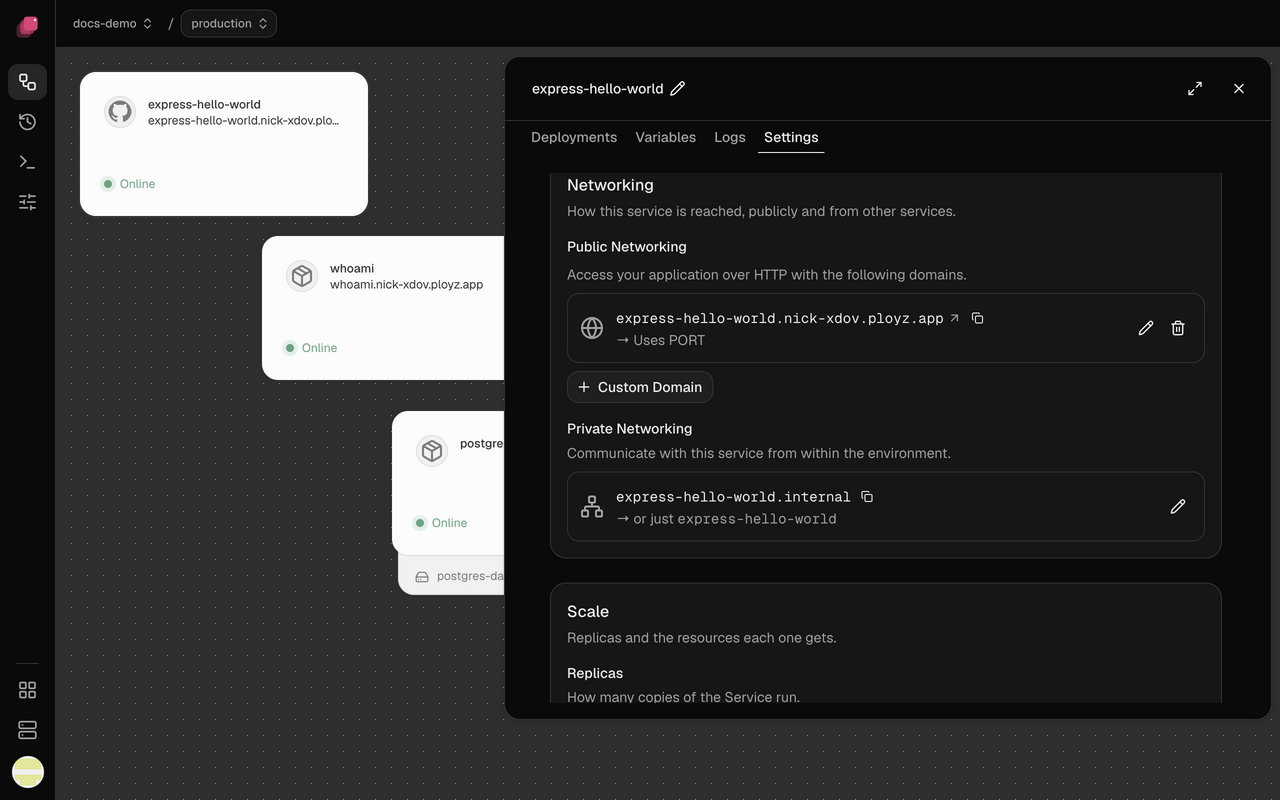
Change a service's private name
The private name starts as the service's name, and renaming the service keeps it.
- In Settings → Networking, type the new name in Private address and press Enter. Clear it to go back to the service's name.
- Click Deploy.
References follow the new name. Services that typed the old one stop reaching it, so update them in the same deploy.
Connect from your laptop
Domains carry http and https only, so to reach a service like a database from your own computer, forward a port with the CLI, as in Connect from your laptop. The CLI page shows how to point it at your project and environment.
Good to know
- Names stay inside one environment. In staging,
postgres.internalis staging'spostgres. - A name finds only ready replicas. A replica is ready once it runs, or once it passes its healthcheck if it has one. One that passed stays even if its check fails later, and its service card shows an amber ⚠. While no replica is ready, the name doesn't resolve. Check that service's Logs.
- Names are scoped to an environment; addresses aren't. Projects and environments on your servers share one private network. A container that knows another environment's private address can connect to it, so give databases a password (the ones Ployz creates have one). Run anything that must be walled off in its own organization, on its own servers.
- Servers must reach each other on UDP port 51820. Without it, services on different servers can't reach each other.