


docs/user/deploy/deployments.md
title: Deployments description: Stage changes, deploy them, follow each deployment, and know what happens when one fails.
Nothing you change in the dashboard reaches your servers until you deploy it. Your edits pile up as staged changes, like a draft, and Deploy makes your servers match. Each deploy becomes a deployment, with its own page and logs.
Stage changes
Settings save as you change them. Config files save when you click Save. Your services keep running as they were. A staged field turns pink until you deploy it (hover it to see what's running now), and the bottom bar counts your changes, like 3 changes.
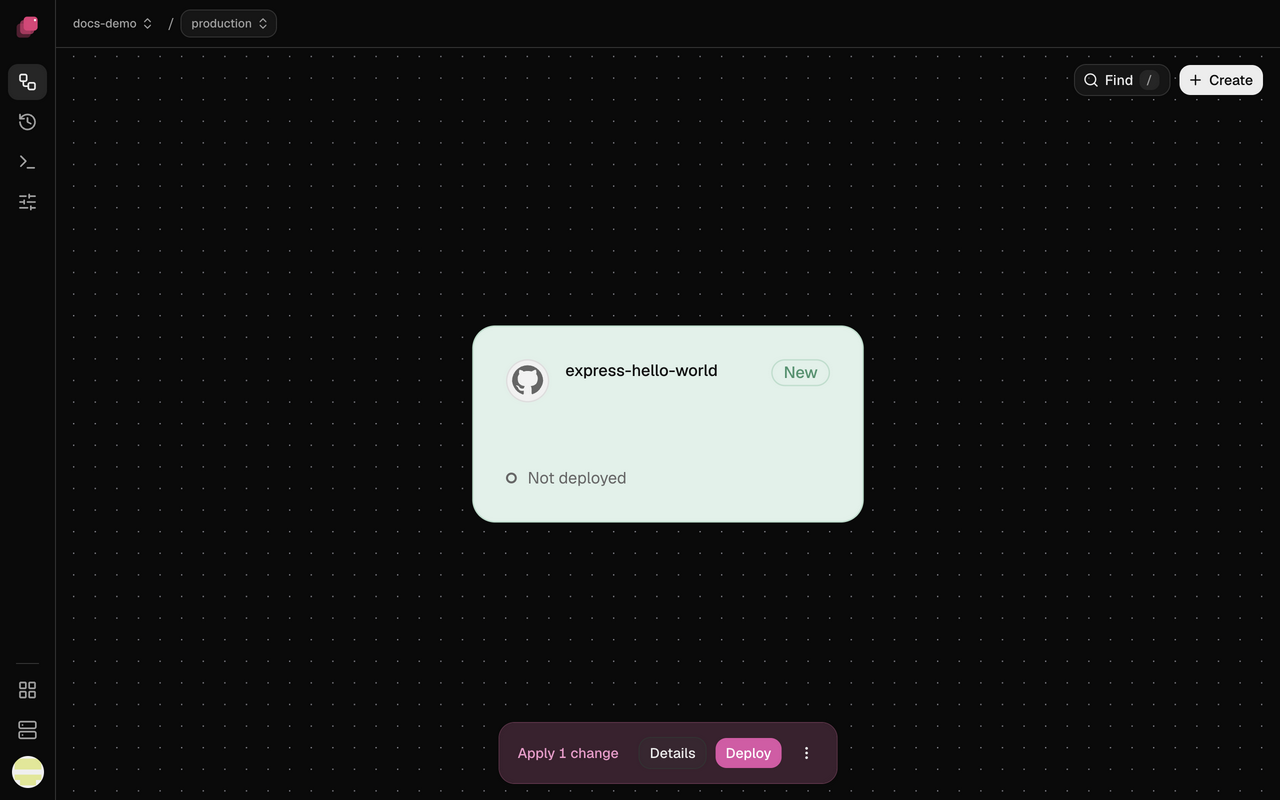
Deleting a service, volume, variable or domain is staged too; discard it and it comes back.
A few settings apply the moment you change them instead, and Discard doesn't undo them: Auto-deploy, Wait for CI, Watch paths, Preferred Builder and a new secret for a private image.
Deploy your changes
- In the bottom bar, click Details to review each change. Add a Message (optional) if you like.
- Click Deploy changes. Deploy in the bottom bar skips the review.
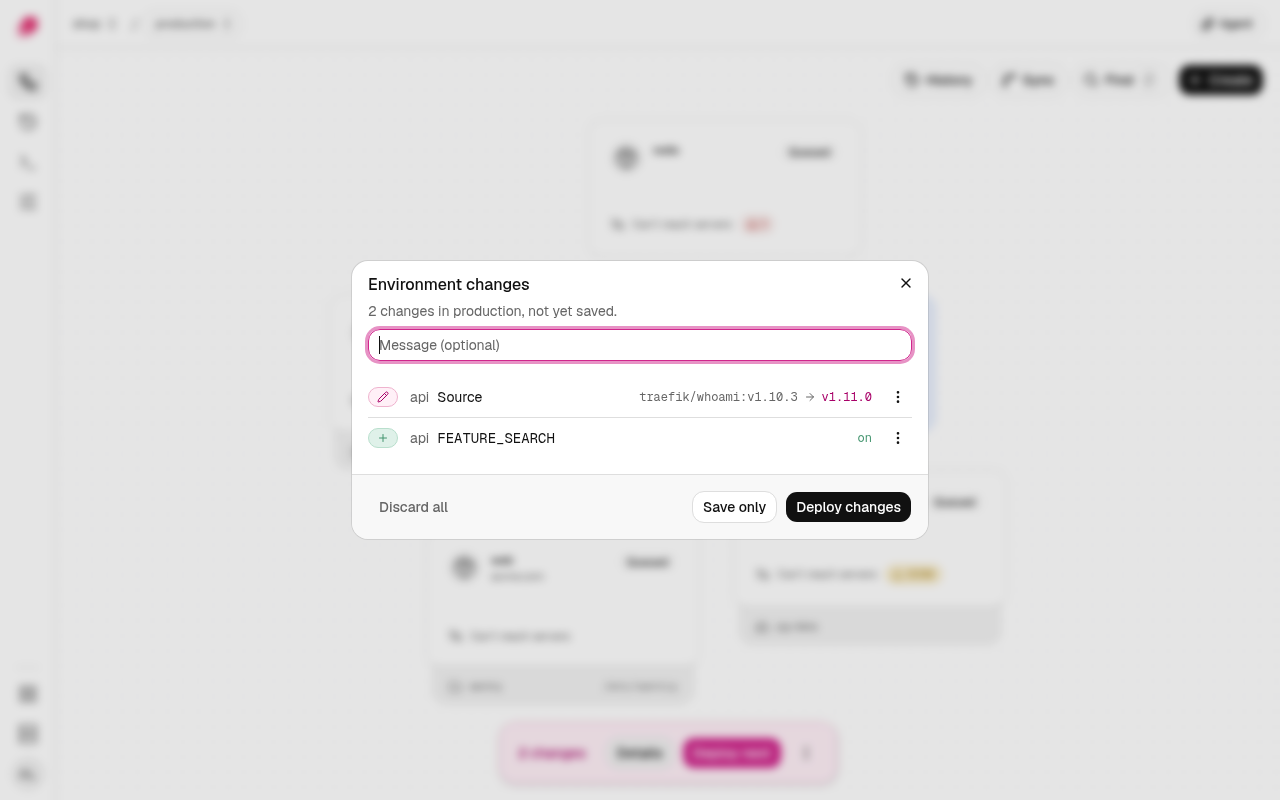
Ployz opens the new deployment's page. A deploy covers the whole environment, not only what you changed: every GitHub service moves to the newest commit on its Git branch, and if you've added or lost a server, replicas spread over the servers you have now (if a service's volume was on a lost server, see When a server goes down). Everything else keeps running as it is. A secret that is Not set never stops a deploy: the deploy skips it, and any variable that references it, and warns.
Save only in Details, in the bottom bar's ⋮ menu, or on Deploy while you hold Alt,
records your changes and optional message without deploying them. Ployz shows Saved, not
deployed. Your
next deploy takes them along, including one started by a push to GitHub; unsaved changes stay
behind. Saving again with no changes creates no new version. The CLI calls this
ployz deploy --skip-deploy, and accepts --message.
To undo, click Discard beside a change, or open ⋮ and choose Discard all changes. Discarding a service or volume you never deployed deletes it. Discard does not save a version. If you discard saved changes back to what is deployed, Details still shows the draft reversal. Saving records that reversal; Discard on its row returns it to the latest saved value.
The dashboard's Deploy needs a staged change. Deploying again with nothing staged is CLI-only for now:
| 1 | ployz deploy |
Saved history
Open Deployments in the sidebar, then Versions, to see this environment's saved versions. Each version is titled from what it changed unless it was saved with a message, and lists its changes one per row, folding past three. The version's ⋮ menu:
- Undo these N changes reverses that version's changed fields and keeps the versions saved after it. The first recorded version has no earlier version to undo.
- Roll back to #N stages that version's complete configuration, undoing every later version. The current version has nothing to roll back to.
Each row's ⋮ undoes that one change. A change the same save tied to others undoes with them, and the menu says how many: adding a Service together with another Service's reference to it, a Volume together with its mounts, or a Source with its repository and branch. Every action stages on the canvas; nothing is saved or deployed until you do.
If an action would overwrite draft changes, the confirmation lists exactly which fields. Cancel changes nothing. If someone edits the environment after your review, reopen the action to review the new draft. Save or Deploy makes the staged result a saved version.
Undo and Roll back pass the same checks as an edit made by hand. One that would leave a reference to a deleted Service, reuse a name or hostname another Service took since, or break a rule is refused with the reason, and nothing is staged.
History restores configuration references. It never brings back a sealed value. A sealed variable that still exists keeps its current value, and one added since stays. A sealed variable deleted since, or one inside a Service that comes back, comes back Sealed and Not set. A toast names those variables, the Service shows · N not set, and its Variables tab offers Set value on each. Deploys leave a Not set variable out of the container until you set it. A variable that was ever sealed can't come back as plain text. A version that only set sealed values has nothing to undo, so its Undo is disabled and says Sealed. Nothing to undo. History does not recover deleted Volume data or undo private-image credential rotations. An accepted deployment and its retries keep their original snapshot while you edit the draft.
From the CLI, ployz history lists versions. ployz history restore 2 --preview reviews a
Restore without writing. ployz history undo 2 stages an Undo; use --accept-overwrite only
after reviewing the named draft fields. Both list each variable that came back Not set, and
--json carries them as not_set. The agent's history tool does the same by revision
number; one that would overwrite draft changes refuses and names them first.
When another deployment is running
An environment runs one deployment at a time. While one runs, Deploy reads Deploy next and yours waits as Queued. If you deploy again while one is waiting, the newest one takes its place.
On the canvas, Deploying shows only on the services the running deployment restarts. A service it leaves running keeps its staged changes on its card.
Follow a deployment
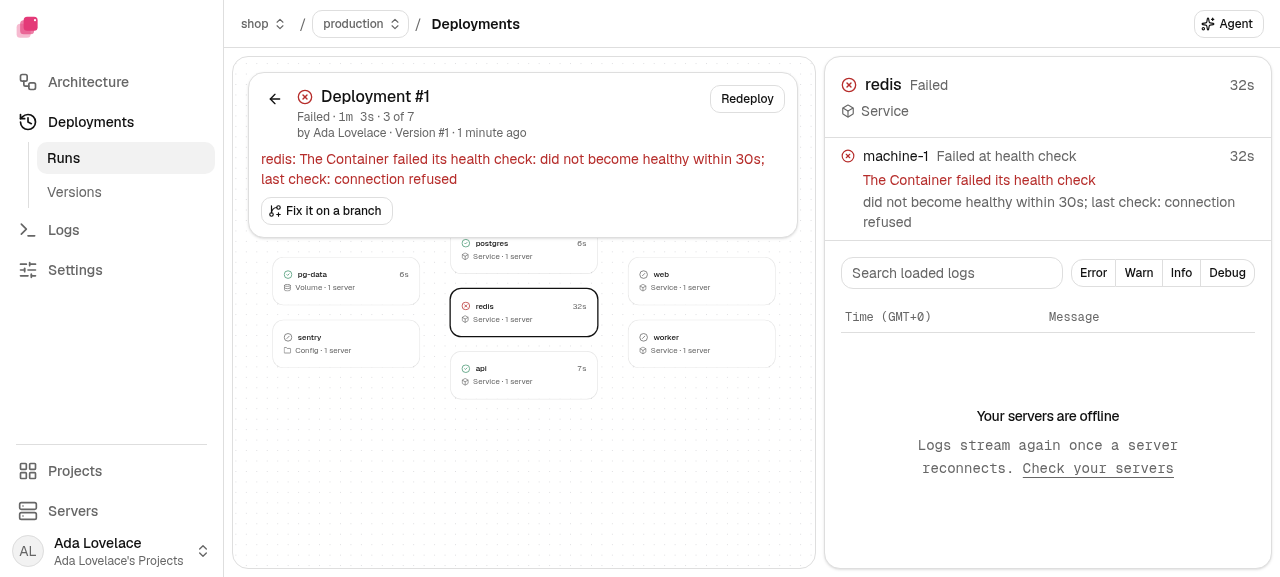
While a deployment runs, the bottom bar shows it. Once it ends, the bar shows Deployed for a few seconds, or Failed until you dismiss it, with Logs to open its page. Failed stays after a reload and in other tabs, as long as the failed deployment is the newest one.
Runs, under Deployments in the sidebar, lists every deployment, newest first. A deployment's page shows its status, who started it and, if it failed, the reason in red under the header. Below that is one card for each build, service, volume and config it touched, laid out left to right in the order they deploy. Click a card to see each server's progress and its logs. A build's card shows the build output, and a service's card shows what its new containers printed. A failed deployment opens on the card that failed.
| Status | What it means |
|---|---|
| Queued | Waiting for another deployment, or for GitHub Actions to build it |
| Deploying | Building, then rolling out |
| Deployed | Every change applied |
| Failed | Something stopped it. A service marked Not attempted never started. |
| Cancelled | Someone cancelled it |
| Unknown | Ployz can't tell what applied. Redeploy it. |
To inspect per-server progress from the CLI, run:
| 1 | ployz --json deployment show 37 |
Each service's nodes[].rows[] records the servers where work ran, its state, and its start
and finish times. Each row identifies its server with machine_id. The server field is a
display name and can repeat across servers. Volume rows use the same Machine IDs to group
the work of services that mount them. A running row also names its phase. Failed rows retain
the cause chain and up to ten final container log lines when available. These outcomes stay with that deployment
when you deploy again. Unchanged services have no rows because no server work ran.
If the runner stops reporting, unfinished rows read unknown. Completed and failed rows keep
their recorded outcomes.
Redeploy or cancel a deployment
- Redeploy, on a failed, cancelled or unknown deployment, ships the same commit and settings again. Your staged changes, volume changes included, wait for your next deploy, and Copies wait for Deploy beside the button says so when volume changes are staged. To ship a fix, change it and deploy instead. A deployment whose restore failed can't be redeployed, because it would mount the new volume empty. Redeploy refuses with "Restore failed. Restore again."
- Cancel, on a running deployment, stops it at its next step. What it already changed stays until your next deploy.
- On a queued deployment, Deploy now starts it if nothing is running ahead of it, and ⋮ → Cancel deployment… takes it out of the queue.
The CLI does the same with ployz deployment retry, start and cancel, and
the agent can too, without asking you first.
Deploy without downtime
Ployz starts the new replicas of a service alongside the old ones and waits until they're all ready. Then every server switches the service's traffic to the new replicas at once, and the old replicas stop once every server has switched, so your app keeps serving. A server that stops answering holds the old replicas for at most five minutes; after that they stop anyway. Before any replica stops, its server marks it as stopping so every server taking web traffic stops sending it requests, and the replica stops a few seconds later.
- Set a health check. Under Settings → Deploy, set Healthcheck to an HTTP path like
/upor a command likepg_isready -h 127.0.0.1. A new replica is ready when the path answers with a 2xx status or the command exits 0. A redirect, tohttps://or/loginfor example, fails the check. Without a health check, the old replica stops a few seconds after the new one starts, ready or not. The databases Ployz creates come with one. - A service with a volume has a short gap. Its old replica stops first, so two never write the same files.
- Migrations run first. A Pre-deploy command, like
npm run migrate, runs once with the new code before any replica is replaced. If it fails or runs past 5 minutes, the deployment fails and the old version keeps running. - Services that depend on each other start in order. If
web's variables reference${{ postgres.DATABASE_URL }},postgresswitches first, and passes its health check first if it has one. Services that don't depend on each other deploy at the same time.
When a deploy fails
Where a new replica doesn't come up, the old ones keep serving. Ployz doesn't roll back: a service that already switched keeps the new version, services that depend on the failed one stay as they were, and services that don't depend on it may have switched already.
Warning
Ployz doesn't undo a pre-deploy command. If a migration ran and the deploy then failed, your database keeps the change while the old version of your app runs against it.
A failed deploy drops the volume change it failed on. Volume changes it never got to go back to your staged changes, and Details marks them Not reached. Deploy again to run them. What the dropped change leaves behind depends on how far it got:
- A move that failed before the handover leaves the volume on its old server, with all its data. Stage the move again when you're ready.
- A move that failed after the handover is not undone: the volume belongs to the new server, and your service stays down until the move finishes there. The move stays in your changes, so deploy again to finish it. See When a move stops.
- A restore that failed is taken back. Your services mount the old volume again, and the new volume goes away. If Ployz can't take it back when the deploy fails, your next deploy fails with "Restore failed. Restore again." and takes it back then. Restore again once you fix the cause. Redeploying that deployment is refused.
- A deploy that shipped a restore it couldn't claim fails before it copies anything, with "the restore waits for the next Deploy." The restore stays staged, so deploy again.
Fix the cause and deploy again; see Troubleshooting deployments. Or click Fix it on a branch on the deployment's page to try the fix in a branch first.
Confirm a deploy that deletes data
When a deploy would delete a volume's data, like a deleted volume or database, a removed mirror or
an old copy a move replaces, Deletes data lists what goes. When it makes a mirror the primary
because the primary's server isn't answering, the title reads Data loss, since the writes after
the mirror's last refresh are lost. Type your project/environment, like my-app/production, and
click Deploy. If you didn't mean it, cancel, then discard the change in Details.
Save only asks the same way, under Next deploy deletes data. Saving deletes nothing and starts no deploy. Your confirmation is saved with the change, so the next deploy deletes that data without asking again. That holds for a deploy you start and for one a Git push starts.
Ployz asks again only when what it would delete changed since you confirmed. That happens when another server starts holding that data, or someone stages a different copy change on that volume. A Git push can't ask, so it keeps the data instead, and so does a push when Ployz can't reach your servers to check. Your next deploy then asks.
From the CLI, ployz deploy and ployz deploy --skip-deploy stop and print the command to run
instead. It names each volume that loses data, like
ployz deploy --skip-deploy --accept-volume-loss postgres-data --expect-version …. Run it only if
you mean it.