


README.md
lodesong for macOS
The player in its own window, and an island around the notch, made to feel like it shipped with the Mac.
 | Playing: the cover left of the notch, bars bouncing right of it. |
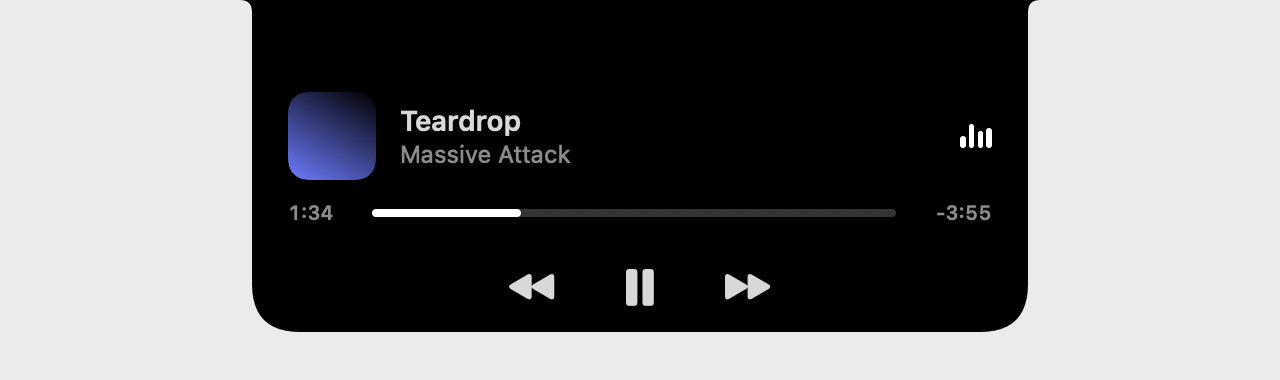 | Hover: it grows into the song, where it is, and ⏮ ⏯ ⏭. |
 | Click: Now Playing (seek by dragging), Lyrics (follow along, click a line to jump), Queue (click to play). Settings are in their own window (⌘,). |
- The notch: on by default on Macs that have one, off on the rest (a Mac mini, an external display only); switch it in Settings (⌘,). Without a notch there's a mini player that stays on top (⌘⇧M) and a menu bar item.
- The bars follow the music: the page measures four bands (bass to treble) on the audio thread and sends them ~15 times a second, only while the island or mini player shows and a song plays; each bar eases to its band. On a song the page can't measure, they fall back to a gentle loop.
- Battery: nothing polls. The player reports changes; the playhead moves on by itself between reports and only while you're looking at it. Measured on an M-series Mac, playing with the window hidden: the app ~1–2 % CPU, the page ~6–8 % (decoding plus the audio graph; the equalizer's filters are unplugged while it's off), live bars included. Launch to ready: ~0.4 s.
- Closing the window keeps the music going; the Dock icon or ⌘1 brings it back. Media keys and Now Playing work through WebKit, the same as in Safari.
- Your login stays in the app between launches (its own WebKit store, apart from Safari's).
- Updates over the air: it checks GitHub's releases at launch and every few hours (when macOS says it's cheap to), downloads a new version in the background and asks to restart. After the restart, What's New lists everything shipped since the version you last opened, every release in between. Settings (⌘,) can turn automatic downloads off.
Install
Download lodesong-macos.zip from the latest release,
unzip, move lodesong to Applications. It isn't signed by Apple yet: the first time, right-click it → Open
(or xattr -dr com.apple.quarantine "/Applications/lodesong.app"). It asks for your lodesong address once.
macOS 14 or later. On managed Macs, apps/macos/pkg.sh builds a pkg that installs through Fleet or any MDM: see
the Fleet guide.
No sound?
Pick Help > Copy Audio Diagnostics and paste the result into the issue or message you were asked to answer. Play a
song first: it is recommended, not required (with nothing playing you get a report that says so). The menu item reads
"Copying..." while it works (up to about 12 s) and a message lists what it found. The report is JSON with findings
first, in words, then what the app and the page see:
- the app, macOS and WebKit versions and the Mac's default output device (its name, sample rate, mute and volume);
- the song (id, title, duration and ReplayGain tags), the stream quality the player chose and the stream's address
reduced to its path and the audio params (
/rest/stream?id=<id>&format=opus): no server address, token or cookie; - both decks:
readyState,networkState, error,currentTime,duration("Infinity"is a stream with no length), muted, volume and gain; - the audio context (state, sample rate, latency), the master and per-deck gains, the normalization in effect and the
loudest sample leaving the audio graph over 0.6 s (
graphPeak: 0 while the song plays is silence inside the page); - the last 20 media events and errors (one line each), whether the levels worklet loads, the service worker's state and the settings that touch sound (stream quality, normalization, pre-amp, crossfade, equalizer);
probe: what lodesong's own server answers to aRange: bytes=0-1request for the stream (status,Content-Type,Content-Length,Accept-Ranges,Content-Range). It goes through lodesong, so a missing length can come from your music server or from a proxy in front of lodesong. It can make Navidrome start a second transcode for a moment: the request is cancelled as soon as the headers arrive.
The report names your song, your output device (a Bluetooth device often carries your name), your macOS version and
your audio settings, and it holds no password, cookie, token or server address. Read it before you paste it.
A part that can't be read is named in findings and the rest still arrives.
To look at the page itself in Safari's Web Inspector, turn it on once and relaunch the app:
| 1 | defaults write engineer.findmalek.lodesong inspectable -bool YES |
In Safari, turn on Settings > Advanced > Show features for web developers. The app then shows up under Safari's
Develop menu, named after your Mac. -bool NO (or defaults delete engineer.findmalek.lodesong inspectable) turns it
off.
Build
| 1 | apps/macos/build.sh # → apps/macos/dist/lodesong.app (Apple silicon + Intel) |
| 2 | swift run --package-path apps/macos Lodesong --preview /tmp/island # the island's states as PNGs |
No dependencies: AppKit, SwiftUI and WebKit. The page talks to the app through apps/player/src/lib/native.ts.
Tests
| 1 | bun scripts/build.ts # the player the app loads, at ./dist/lodesong |
| 2 | swift test --package-path apps/macos |
swift test starts the mock Navidrome and ./dist/lodesong on free ports, loads the player in a WKWebView made by
PlayerView.makeConfiguration() (the one the app uses) and checks what the page does in this engine:
canPlayTypefor opus, mp3, aac and flac, and the configuration the app runs with (media policy, persistent store, user agent).- Sound reaching the output for original, mp3 and opus streams, through
test/output-tap.js(the tap the e2e specs use). - Playback started by the native bridge with no DOM tap (what the island, menu bar and media keys do). WebKit counts
script run through
callAsyncJavaScriptas user-activated (navigator.userActivation.isActiveis true), so this case is audible with or without the app's media policy and does not prove it. - Playback started with no user activation at all: the page reloaded on its saved queue, where a page timer (waiting
out the few seconds script the app ran still counts as a gesture) presses play,
navigator.userActivation.isActiveis false at that moment, and it is audible. SettingmediaTypesRequiringUserActionForPlaybackto.allmakes this test fail.hasBeenActiveis already true in a page the app loads itself (observed, not explained), so only the transient activation is asserted. - The app's commands (
toggle,next,seek) moving the page.
The harness makes no sound. Each test web view is muted at the page (Silence.mute, WebKit's _setPageMuted:, checked by
reading the state back and stopping the run if WebKit refuses), below Web Audio: the context runs and the tap's analyser
still sees the 440 Hz tone, but the web process hands the device zeros. After every audible check the harness measures
the loudest sample the page's GPU process sends the device (a Core Audio process tap, macOS 14.2+) and fails above zero;
SpeakerMeterTests shows that meter hears a -70 dB tone from a page that is not muted, so its zero means silence. Where
the process tap can't be made (no permission) or CI is set (the tap asks for permission, which blocks a runner) the measurement is skipped with a trace line and
only the mute readback stands. Playwright's WebKit has no sinkId support, so test/output-tap.js routes every sink but
real to a zero gain instead of the device.
A Mac with no audio output device never starts an AudioContext: locally the sound checks are skipped with a message, in
CI (CI set) they fail. Each run wipes the test web view's website data first. LODESONG_HARNESS_PORT pins the app
port (the mock takes the next 19, default: free ports), LODESONG_HARNESS_LOG copies the harness trace to a file.